
Guide · 8 min read
How to test Meta ad creatives with AI
By Pavan, Founder, FirstReaction · Updated
Short answer
Upload each creative to an AI testing tool with the same audience description, then compare how each scores and why. Good tools read the image or video itself (product visibility, text, proof, offer) and tell you which buyer types it loses. Test versions that differ in one thing, run each more than once, and live-test the winner.
What AI can read in an ad creative
Modern AI models read images and video, not just text. That lets them check the things that decide whether a Meta ad works, before it runs:
- Images: is the product clear at a glance? How much text is on the image, and is it readable at phone size? Is there proof (reviews, ratings, press)? Is the price or offer visible? What does the eye land on first?
- Video: what happens in the first seconds, the pacing, captions for people watching without sound, when the product appears, and whether the end card asks for anything.
- Carousels: how interest changes card by card, repeated or mismatched cards, and whether the first card earns the swipe.
- Copy: whether the headline, primary text and call to action say the same thing as the creative.
What AI can't see is the world around the ad: the auction, your competitors' ads in the same feed, or your landing page.
Four ways to test creatives with AI
| Approach | How it works | Good for | Limit |
|---|---|---|---|
| A general chatbot | Upload the ad to ChatGPT, Claude or Gemini with a careful prompt | A free first critique | Answers change between chats; no fixed audience to compare versions |
| Attention prediction | Heatmaps of what people notice first (Neurons, Dragonfly AI) | Busy layouts; checking the product and offer get seen | Attention isn't persuasion |
| Creative scoring | A predicted performance score per creative (AdCreative.ai, Pencil) | Ranking lots of generated creatives | One number; doesn't say who you lose or why |
| Audience simulation | Buyer types from your audience react to each creative (FirstReaction.ai) | Comparing versions and finding what to fix | A prediction, not a measurement |
See our comparison of AI tools for Facebook ad testing for more on each.
How to test creatives with an audience simulation
- Describe the audience once, specifically: who, where, what they buy, how warm they are, and what makes them hesitate. Save it, so every creative is tested against the same buyer types.
- Make versions that differ in one thing: the image, the opening of the video, or the headline. Change three things at once and you won't know which one mattered.
- Add the creatives to a campaign. In FirstReaction a campaign takes up to 10 images and 5 videos, and every one is ranked.
- Run each version more than once and compare the averages.
- Read the per-buyer-type results. Look for the type that drops out, and the reason it gives.
- Apply the fixes, run again, then live-test the top one or two with a Meta A/B test.
A prompt you can use with any chatbot
If you'd rather start with a general chatbot, a structured prompt gives far more useful answers than "what do you think of this ad?":
You are reviewing a Facebook/Instagram ad before launch. The audience is: [who, where, age, what they care about, how warm they are, what makes them hesitate]. Look at the attached creative and this copy: [headline, primary text, call to action]. List (1) what someone in this audience notices in the first second, (2) three things that make them want to click, (3) three things that make them scroll past or hesitate, with the exact element responsible, (4) any text on the image that's hard to read on a phone or doesn't match the copy, and (5) the three changes most likely to raise clicks, using only claims visible in the ad. Don't invent reviews, ratings or numbers.
Use the same prompt and audience text every time you compare versions, in fresh chats, and expect some variation between runs.
Example: a holiday discount ad
Here is a live Lola Blankets holiday ad, simulated against US shoppers who buy home decor and gifts online.
Real simulation
Lola Blankets: “Lola for the Holidays” 35% off ad
Audience: US women, 25–55, cold audience, who shop home decor and gifts online. A $300+ blanket is a considered purchase: they check reviews and want to know it's worth it.
Live Meta ad from the Ad Library, running since 26 Oct 2026. Simulated on FirstReaction, 31 Oct–1 Nov 2026; scores are the average of 3 runs per version, on a 0–100 scale.
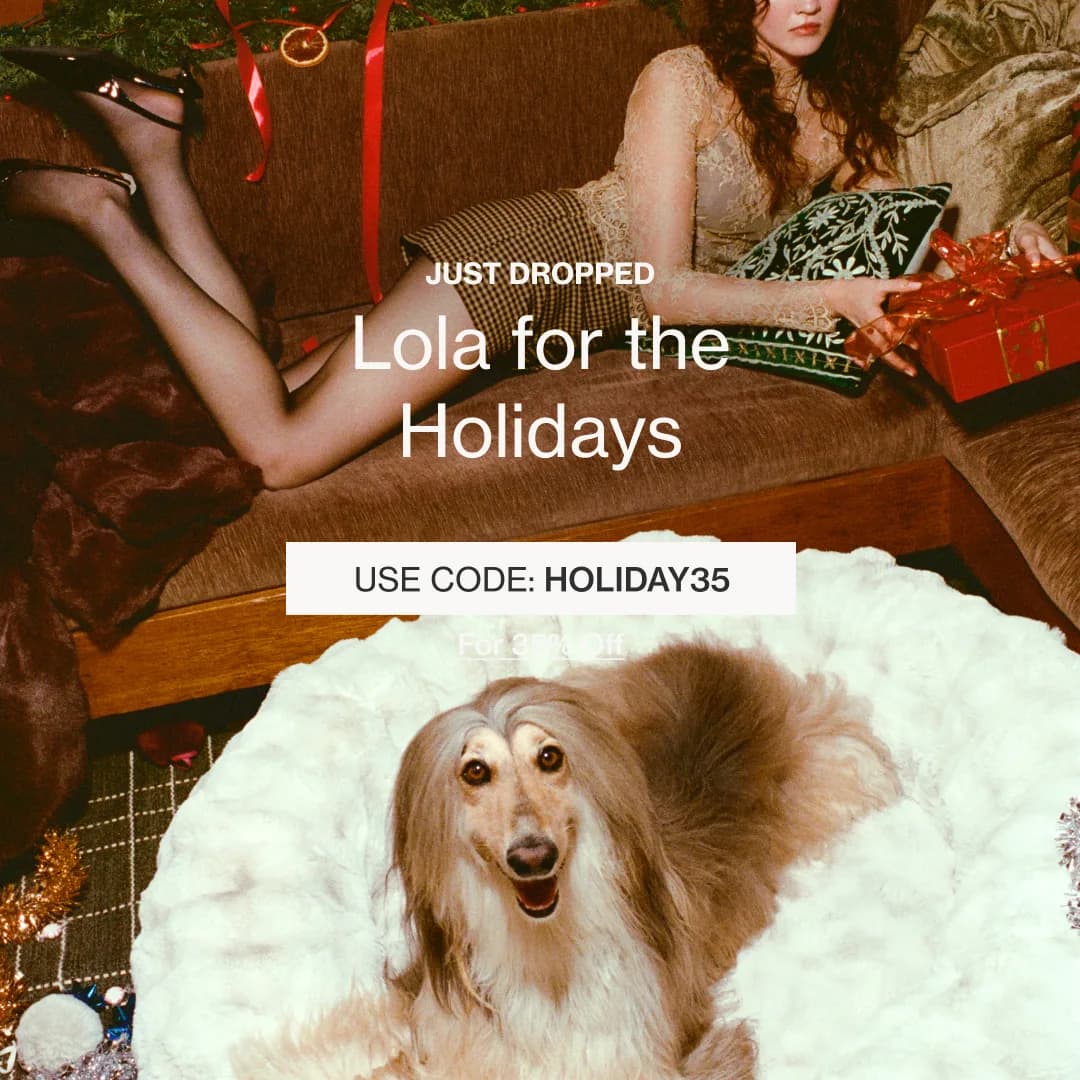
Original (live ad)
Get 35% Off With Code: HOLIDAY35
LOLA FOR THE HOLIDAYS. Get 35% off with: HOLIDAY35
- Likelihood to act
- 44
- Engagement
- 55
- Scroll-stop
- 62
- Image score
- 62
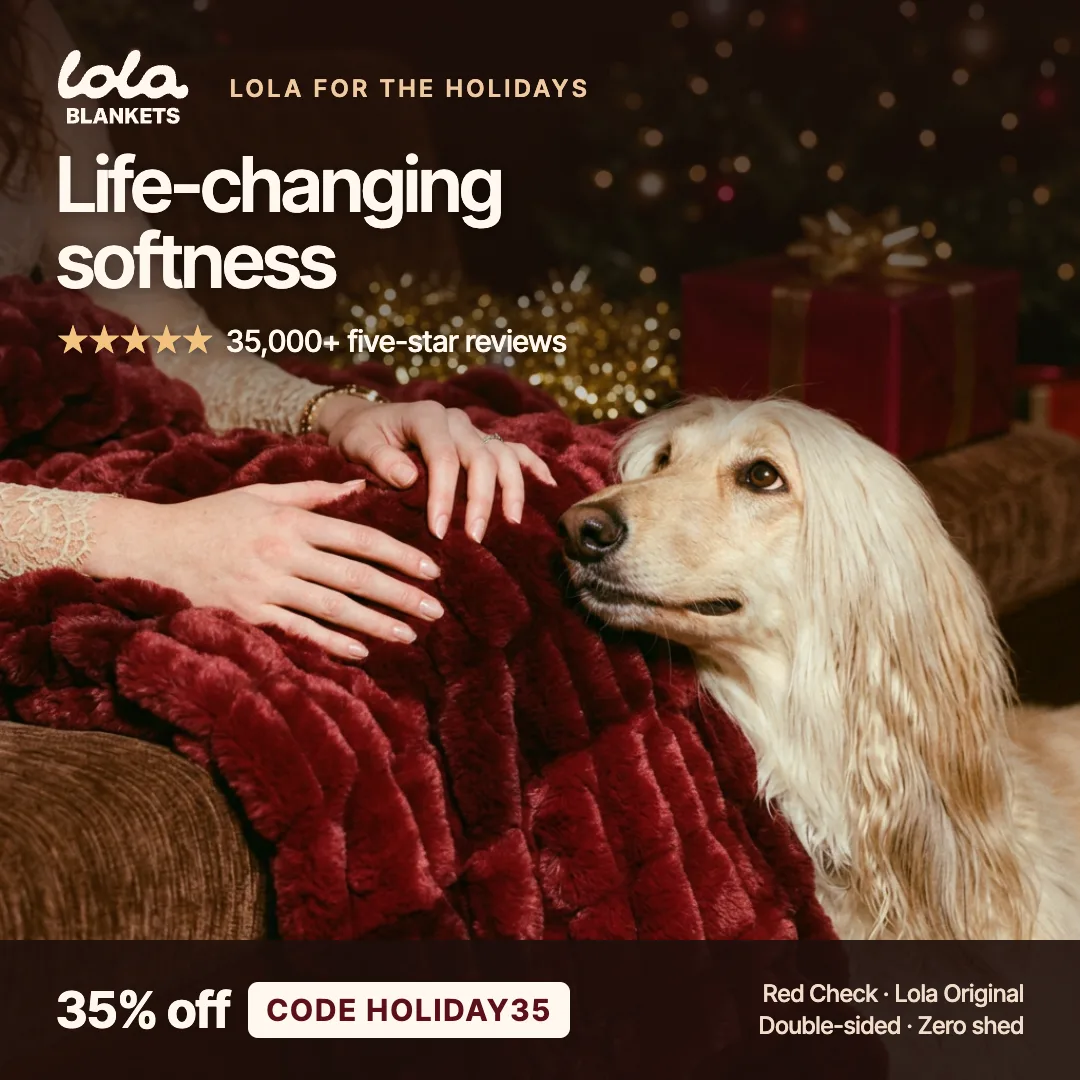
Optimised (rebuilt from the suggestions)
Life-Changing Softness: 35% Off
Lola for the holidays: life-changing softness, from the blanket with 35,000+ five-star reviews. Get 35% off with code HOLIDAY35.
- Likelihood to act
- 68
- Engagement
- 74
- Scroll-stop
- 76
- Image score
- 77
| Archetype | Before | After | Change |
|---|---|---|---|
| Discerning Decorator | 33 | 63 | +30 |
| Thoughtful Gifter | 41 | 75 | +34 |
| Cozy Comfort Seeker | 45 | 81 | +36 |
| Value-Driven Splurger | 58 | 57 | -1 |
| Trend-Curious Home Enthusiast | 42 | 65 | +23 |
Likelihood to act, per archetype.
What worked
- A cozy, festive holiday mood
- A happy dog curled up in the fur
- A discount code that's easy to spot
Where it lost people
- It never says what Lola is
- The blanket's softness is never shown
- No reviews to trust
What it suggested
- Say what Lola is: life-changing softness
- Make the blanket the hero, with hands sinking into it
- Show the five-star reviews
Scores are predictions from a simulated audience, not real campaign results. Not affiliated with Lola Blankets.
The original leaned on mood and a discount code, but never said what Lola is or showed why the blanket is special. The rebuilt version kept the code and the dog, made the blanket the hero, said what Lola is ("life-changing softness"), and added the 35,000+ five-star reviews from Lola's own site.
Four of the five buyer types jumped, by 23 to 36 points. The fifth, the Value-Driven Splurger, stayed flat (58 to 57): the discount was already doing its job for them, so a better product story didn't add much. That's the kind of trade-off worth knowing before you choose: if deal-seekers are your main buyers, the original's simplicity was fine; for everyone else, it was leaving clicks behind.
Mistakes to avoid
- Testing too many changes at once. You'll get a winner but no lesson.
- Trusting one run. AI results move a few points between runs; average several.
- A vague audience. The more generic the description, the more generic the feedback.
- Reading only the score. The reasons are what tell you what to change.
- Adding claims you can't back. If a suggestion proposes a rating or number, only use it if it's true.
You can test your own creatives on FirstReaction free, with 25 credits and no card.
Frequently asked questions
Can AI really see my ad image?
Yes. Multimodal AI models read images and video directly: the product, the text on the image, faces, layout and the offer. They can still misread small details, so check their notes against the creative.
Is ChatGPT or a dedicated tool better for testing creatives?
A chatbot is a good free first critique. A dedicated tool is better for comparing versions, because it tests every version against the same audience and returns comparable scores and reasons.
Does AI creative testing work for video and carousel ads?
Yes. For video it looks at the opening seconds, pacing, captions and end card; for carousels it shows how interest changes card by card and flags repeated or mismatched cards.
How many creatives should I test at once?
Test as many versions as you like before launch, since simulation is cheap, then take only the best one or two into a live test.
Will AI testing catch ad policy problems?
It can flag likely problems. FirstReaction runs an advisory check against Meta's advertising policies, but only Meta's own review decides whether an ad is approved.
Sources
Related guides
- Best AI tools for Facebook ad testing (2026)A fair guide to AI tools for testing Facebook and Instagram ads, grouped by what they do: audience simulation, creative scoring, attention prediction, live analytics, and free options like Meta's own tools and AI chatbots.
- How to test Facebook ad hooksHow to test the first seconds of a Facebook or Instagram ad: what counts as a hook, hook rate and hold rate, nine hook types, live and pre-launch testing, and a real example where the hook wasn't the problem.
- What is AI audience simulation in advertising?How AI audience simulation works for Facebook and Instagram ads, what the research says about simulated buyers, a real example with five buyer types, and where it falls short.